Updated


Remove Multiple Watermarks from Photos
Got a photo with the same logo or name repeated all over it? Upload it and the AI finds every copy for you. See a clean version in about a minute.
or drop a photo here · JPG, PNG, or WebP up to 20 MB · up to 10 photos
For photos you own or have permission to edit.
- Free preview
- Never used to train AI
- Auto-deleted in 24 hours
- Full-size downloads with any plan
To remove multiple watermarks from a photo, upload it and let the AI do the finding: it detects every copy of the repeated logo, text, or line across the whole picture and rebuilds the image underneath, so you never brush over each mark by hand. It takes about a minute, and you can see your result free before you download. Use it only on photos you own or have permission to edit.
Three Kinds of Repeated Watermarks, Before and After
Repeated marks come in a few common shapes. Drag each slider to see how the AI handled rows of text, a grid of small logos, and crossing diagonal lines in our own sample tests.
How to Remove Multiple Watermarks from a Photo
Look for a clean file first
If you bought the photo, open the download you received before editing anything. Purchased files from most galleries arrive without the watermark, and that copy will always look best.
Upload a photo you have the rights to edit
If the marked copy is all you have, drop it into the tool above. JPG, PNG, and WebP all work, up to 20 MB. You don't need to select or circle any of the marks.
Zoom in, compare, then download
Check the before and after at full zoom, especially faces, hair, and patterned clothing. Thin lines and tiny logos can leave faint traces, so look before you download.
A Studio Name Repeated in Rows
Rows of the same name running edge to edge are one of the most common marks on previews. Fixing it by hand means patching every copy on its own, which can be dozens of separate repairs in Photoshop, and the text usually crosses faces and patterned clothing. The AI treats the whole photo at once and finds every line of text without being told where to look. The hard part is the overlap: letters that cross a face or a busy pattern leave the least clean photo around them to rebuild from. In our sample, a garden portrait of an older woman and her son was covered in staggered rows of a studio name. Every row came out, including the letters across both faces, and the floral top and knit shirt kept their texture. Results vary, so check faces and patterns at full zoom.
Try it free
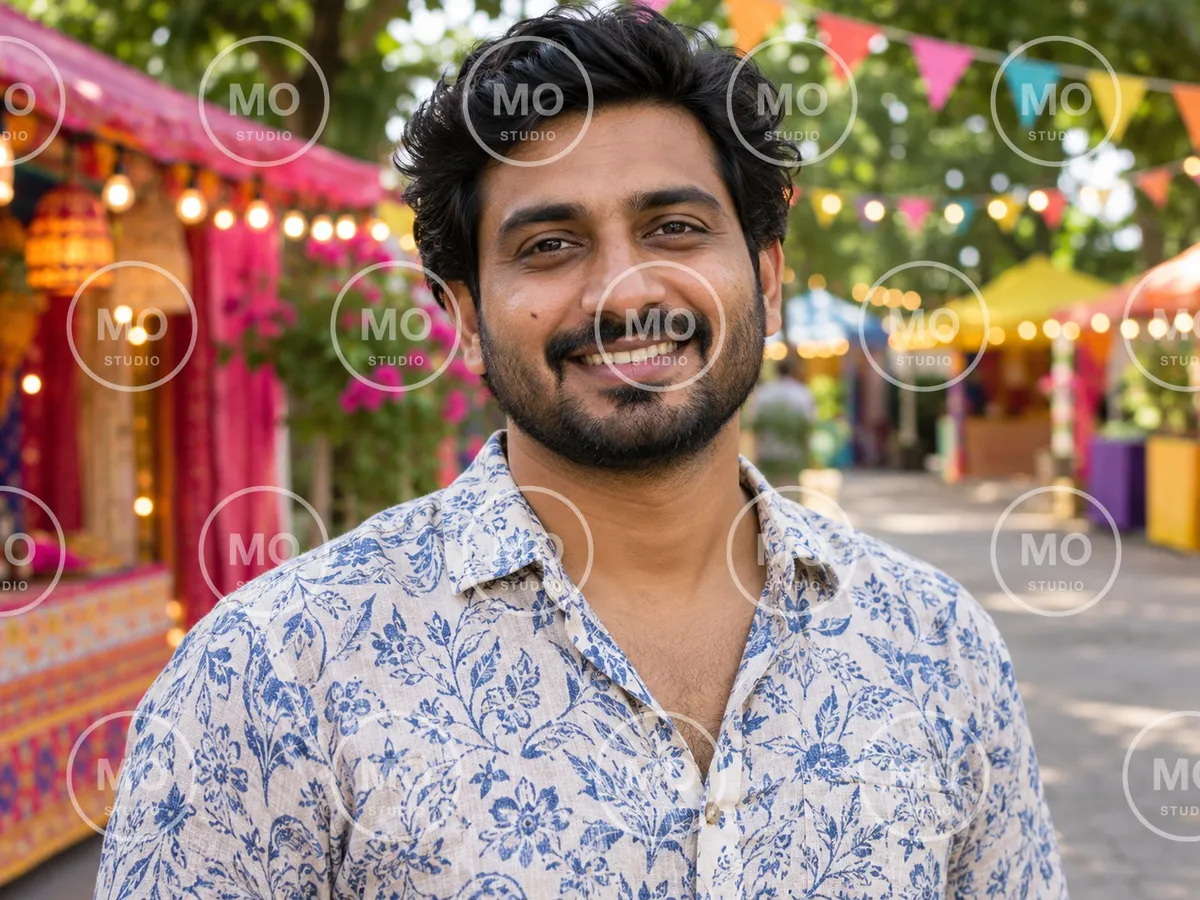
A Small Logo Repeated in a Grid
A small round logo stamped again and again in a staggered grid is a different problem. There may be dozens of copies, but each one is tiny and sits on its own patch of background, clothing, or skin. By hand that's dozens of tiny repairs, and it's easy to miss one. The AI finds the whole grid at once. The hard part is volume rather than size, because a single missed copy stands out against clean surroundings. In our sample, a man in a blue floral shirt at an outdoor market was covered in small round logos. All of them came out, and the blue floral print on his shirt showed no ring outlines at full zoom. Results vary with how solid each logo is.
Try it free

Diagonal Grid Lines with a Repeated Name
Some previews add thin crossing lines that form a diamond grid, with a small name repeated inside it. The lines run through the entire frame, so you can't paint over one area and move on. Fixing them by hand means following each line across the whole picture. Lines are also harder than text to judge, because a thin line that's mostly gone can still leave a faint trace that only shows up at full zoom. In our sample, an older couple embracing in an autumn forest had a diamond grid across the frame. At full zoom we found no line traces on the faces, the patterned sweater, or the plaid shirt, though skin looked a touch smoother than before. Check the whole frame before you download.
Try it freeWhen People Need to Remove Repeated Watermarks
Gallery preview photos
The preview you were sent has the studio's name tiled across it, and you have permission to edit the photo but no clean file.
A whole wedding or family set
Every proof from one session carries the same repeated mark, and you want clean copies of a full set you have the rights to.
Old scanned previews
Decades-old proof prints scanned for the family archive, still marked all over.
Photographers recovering their work
You lost the unmarked exports from an old shoot and only have your own watermarked previews left.
Event and competition photos
Photos you have permission to use from a school event, tournament, or race, where the preview carries a repeated mark.
Newborn photos with a tiled studio logo
A baby session where every frame has the studio logo repeated across it, and you want clean copies for the baby book.
Before You Remove Repeated Watermarks
A repeated mark is meant to stop a preview from being used as the finished photo, so there's often a cleaner route than editing. These checks take a few minutes.
Open the file you actually bought
ShootProof's help center says tiled text and image watermarks are both options, and that watermarks are always removed from ShootProof-fulfilled digital downloads that clients purchase (checked November 2026). If you only looked at the gallery on screen, your purchased file may already be clean.
Use the largest copy you have
The tool keeps your photo at the size you upload. A bigger file gives the AI more detail to rebuild from, and it prints better afterward.
Pick a photo where the marks miss the eyes
If you have several photos from the same session, start with the one where the repeated marks stay off the eyes and mouth. Those are the hardest areas to rebuild.
Zoom in on lines and patterns
Check thin lines, hair, and patterned clothing at full zoom before you download. Faint traces of a line or a small logo are easy to miss at a glance.
Best For and Not Ideal For
Here is where this works well and where it doesn't, based on our own sample tests.
Works best on
- Semi-transparent text or logos repeated across the photo
- Small, regular marks, like a grid of tiny logos
- Thin lines in a grid, as long as you check them at full zoom
- Photos you own or have permission to edit
Not ideal for
- Nearly opaque, large repeated blocks that hide faces
- AI-resistant watermarks that add visual noise (ShootProof offers this option; we haven't tested it)
- Photos you don't have the right to edit, such as stock photos you haven't licensed
Frequently Asked Questions
Can AI remove a watermark that's repeated all over a photo?
Yes. Upload the photo and the AI finds each copy of the repeated logo or text across the whole frame, then rebuilds the picture underneath. Fainter, smaller marks that are evenly spaced usually come out best. Nearly solid marks over faces are the hardest. Results vary, so check eyes, hair, and patterned clothing at full zoom before you download.
Do I have to select each watermark?
No. You don't select, circle, or brush over anything. The AI detects every copy of the mark on its own, whether it's a handful of logos or dozens of lines of text. That is the main difference from a clone-stamp or healing brush, where you repair each copy by hand and a single missed spot shows.
How do I remove grid or line watermarks from a photo?
Upload the photo the same way. Grid and line watermarks are handled automatically, with no selecting. Thin lines are harder to judge than text, because a line that's mostly gone can leave a faint trace that only shows at full zoom. Check the whole frame before you download. If a trace remains, try the stronger model offered next to your result.
Can I remove watermarks from multiple photos at once?
Yes. Select up to 10 photos at once and the AI cleans them one after another, about a minute each, using 1 credit per photo with Remove 4.0. Download all then saves the photos you paid for in one zip. This page is about many marks on one photo; for whole galleries, see our batch watermark remover. For a set of 20 to 60 photos, Plus is $8 a month for 60 credits.
Is it free to remove multiple watermarks from a photo?
Seeing the result is free. Sign up, upload your photo, and the cleaned version appears in about a minute with a small preview mark on screen. Downloading the clean, full-size file takes a credit, and one photo is $1.99. If you bought the photo, ask the photographer or gallery for the original download first. It's free and gives the best quality.
Is it legal to remove watermarks from a photo?
It depends on whether you have the rights to the photo. Use this tool for photos you own, or with the photographer's permission. Buying a photo or a print doesn't automatically include the right to edit the digital file. If you just want the photo without paying, please buy it from your photographer. We can't give legal advice.
What happens to my photo after I upload it?
Your photo and the cleaned result are stored encrypted and deleted automatically within 24 hours. We don't use them to train AI models, and we never sell or share them. We use the photos you upload only to deliver your result, and you can find your recent results in My files until they're deleted.
More Watermark Removal Tools
Guides to Proofs and Photo Rights
What your purchase covers, how proof galleries work, and when removing a watermark is allowed.

See Your Photo Without the Repeated Marks
Upload a photo you have the rights to and see the result in about a minute. See your first result free when you sign up.
Remove watermark nowEraseBunny is an independent tool and is not affiliated with, endorsed by, or sponsored by ShootProof. ShootProof is a trademark of its respective owner. Only remove watermarks from photos you own or have permission to use.